
PCB Impedance tester
- TIME:2019-12-30
- View:62
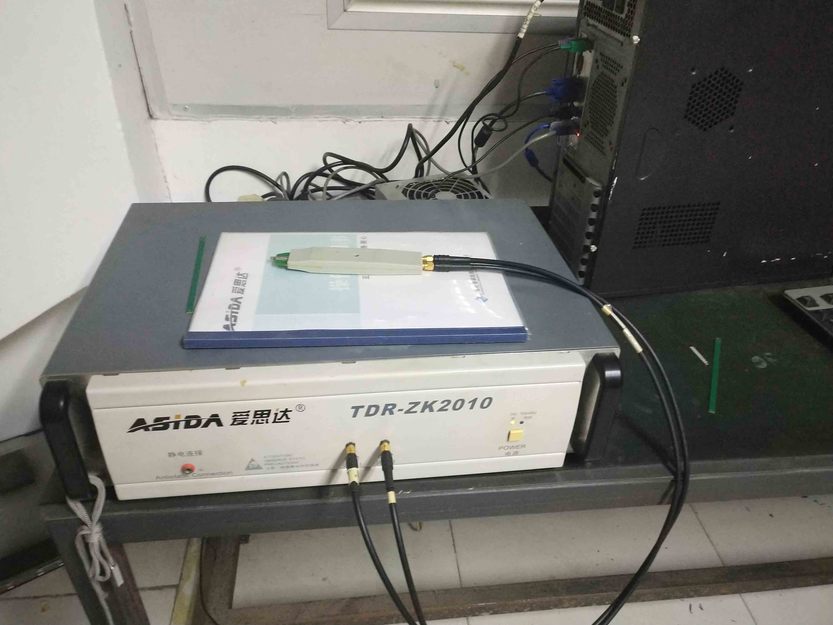
Detailed description of PCB impedance tester:
Purpose: the characteristic impedance test system is designed with time domain reflection technology, which can test the characteristic impedance of PCB trace in batch, automatically, quickly and accurately, and provide functions such as test waveform analysis, statistical data analysis, automatic recording of test data, automatic issuance of test report and printing. It is applicable to the R & D, design, production and quality control units of circuit board manufacturers. It provides a fast, accurate, standard and economical solution for the characteristic impedance test of high frequency circuit board.
Technical parameters of PCB impedance tester
Project specifications
Model tdr-zk2130
Control impedance test range 20-150 Ω
Measurement accuracy 50 Ω± 1%
Measuring length 0.05-2m
Horizontal display resolution 0.2mm
Vertical display resolution 0.05 Ω
Test methods time domain reflection method
Bandwidth 3GHZ
PCB impedance tester features:
1. Batch, automatic test, simple operation, fast test, suitable for PCB Factory fast test.
2. Windows operating environment, friendly human-computer interface, automatic test results.
3. Provide single ended and differential impedance tests.
4. Support 2-channel, 4-channel and 8-channel tests.
5、 Quick customized test task and batch and automatic test function.
6. Integrated test file editor to quickly set test parameters.
7. Automatically record test data, generate reports and save them on disk.
8. Display test waveform, statistical data analysis and test results.
9. Print test reports, waveforms and test results.
10. Comply with IPC-TM-650 and ipc2141 standards.
Solutions to common problems of PCB impedance tester
1. The numerical error is too high during the calibration.
Cause: caused by misoperation.
Solution: shut down for 1 hour, turn it on again for calibration.
2 software error is reported in single deletion.
Cause: operation is too fast.
Solution: you need to restart the software.
3 power on for 48 consecutive hours, and the log is not updated in time.
Cause: the machine will have self-protection function for a long time (no operation for more than 12 hours).
Solution: restart the software.
4 the horizontal resolution shows that part of the grid disappears.
Cause: the horizontal resolution adjustment is too small.
Solution: adjust the horizontal resolution to what you need.
- Company profile
- Company profile
- Contact us
- Product display
- PCB products
- pcba products
- 技术支持
- Contact us
- 圳市宝安区福海街道和平社区同富裕工业区东震包装有限公司厂房整套第五栋第一层 Floor 1, building 5, factory building, Dongzhen Packaging Co., Ltd., tongfuyu Industrial Zone, Heping community, Fuhai street, Bao'an District, Shenzhen
- TEL: 13534217231
- Message feedback
